Back to documentation
Choose Settings
First pick your solver mode with the Normal | Tripod switch, then choose your settings
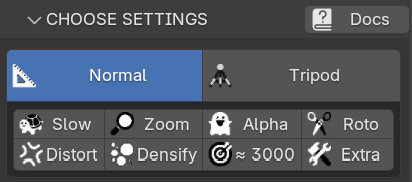
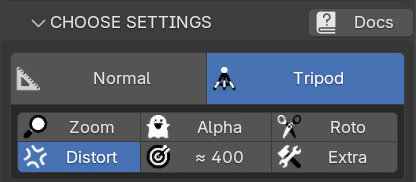
normal settings (left) and tripod settings (right)
- Normal | Tripod - normal solves shots with camera travel (parallax), tripod solves pan/tilt shots
- Slow - slower but more reliable solve (CPU) - also solves k2 distortion (normal only)
- Zoom - solve for varying focal length (for zooming shots)
- Alpha - use alphas of the image sequence (for masking)
- Roto - automatically roto foreground actor and generate alphas
- Distort - account for lens distortion (undistorts the sequence in normal mode)
- Densify - generate a dense point cloud of the scene (normal only)
- Features - target number of features to extract per image
- Extra - exposes advanced parameters for camera/tripod solving
Advanced Settings
These are the advanced parameters for standard tracking
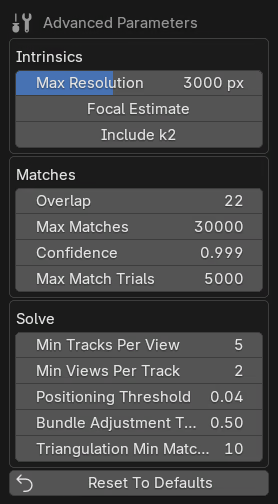
- Max Resolution: Maximum image resolution to use internally
- Focal Estimate: Give the solver a focal length estimate (35mm equivalent)
- Include k2: Include radial k2 intrinsic in distortion model
- Max Matches: Maximum number of matches per image pair
- Match Confidence: Threshold for RANSAC
- Max Match Trials: Maximum number of RANSAC trials during matching
- Overlap: How many neighbouring frames each frame is matched against
- Min Tracks Per View: Minimum number of tracks needed for an image to be included
- Min Views Per Track: Minimum number of images needed for a track to be included
- Positioning Threshold: Error threshold for accepting a camera pose in solve
- Bundle Adjustment Threshold: Threshold to reject outliers in solve
- Triangulation Min Matches: Minimum number of matches/correspondences to triangulate a point
- Reset To Defaults: Resets all advanced parameters to recommended default values
Advanced Tripod Settings
These are the advanced parameters for tripod tracking
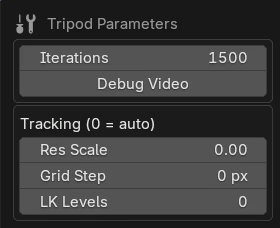
- Iterations: Solver iterations - higher means a tighter solve but slower
- Zoom Smoothness: Smoothness of the solved zoom curve (only shown when Zoom is on)
- Debug Video: Saves a debug.mp4 tracking overlay into the image folder
- Res Scale: Tracking resolution scale (0 = automatic, recommended)
- Grid Step: Feature grid spacing in pixels (0 = automatic)
- LK Levels: Optical-flow pyramid levels (0 = automatic)
- Reset To Defaults: Resets all advanced parameters to recommended default values