This page contains documentation, tutorials, and a list of common preventable errors. Read carefully! Chances are if you came here with an issue the solution is already covered here.
Main UI
Here is what all the buttons do. Note that you can hover over any button in CameraTracker for a tooltip description as well:
Sequence from Video: selects a video and converts it into an image sequence in the same directory.
Mask Actor: automatically creates a mask around the main detected actor.
Mask: use the alpha of the sequence as a mask.
Zoom: shot contains changing focal length.
Undistort: undistort the sequence using calculated lens distortion.
Densify: generate a dense point cloud of the scene.
Accurate: use slower but far more accurate computation for the camera solve.
Features: target number of features to extract per image.
Run Tracker: track the camera using the current settings.
Cuda: use cuda acceleration (Nvidia GPU only).
Clean Points: find and delete outliers from the selected point cloud.
Invert Motion: swap camera and object motion.
Reset: reset the sequence folder for a new track.
Advanced Parameters
The advanced parameters are for... well, advanced users:
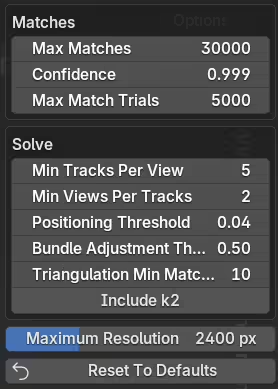
Max Matches: Maximum number of matches per image pair.
Match Confidence: Threshold for RANSAC.
Max Match Trials: Maximum number of RANSAC trials during matching.
Min Tracks Per View: Minimum number of tracks needed for an image to be included.
Min Views Per Track: Minimum number of images needed for a track to be included.
Positioning Threshold: Error theshold for accepting a camera pose in solve.
Bundle Adjustment Threshold: Threshold to reject outliers in solve.
Triangulation Min Matches: Minimum number of matches/correspondences to triangulate a point.
Include k2: Include radial k2 intrinsic in distortion model.
Maximum Resolution: Maximum image resolution to use internally.
Reset To Defaults: Resets all advanced parameters to recommended default values.
Tutorials
Windows Installation
Mac Installation
Basic Tracking
Zoom Tracking
Resetting
Clean Point Cloud
Invert Motion
Object Tracking
Dense Point Clouds
Rotomation
Recovering a Failed Track
Common Preventable Errors
This list covers installation/usage errors (problems with the setup) and tracking footage errors (problems with the chosen footage). If you have an error, it is here! Note that your final error message may not represent the true underlying issue...
Version Errors
Blender Version: Must use the correct build for your Blender version. 4.3-4.5 builds for Blender 4.3-4.5 and 5.0+ builds for Blender 5.0+. Additionally Blender must be downloaded from Blender.org - Steam, Microsoft Store, and portable versions may not work.
Addon Version: Make sure to install the Mac version for Mac and the Windows version for Windows.
Windows Compatibility: Windows machine must be x86-64 (not ARM). Use an updated OS.
Mac Compatibility: Mac machine must have an M-series chip (ARM) - older intel chips will not work. Use an updated OS.
Specific Errors
Policy Violation With sys.path: This is actually not an error. Just a warning that an external python library (pillow) is being used.
Permission Errors
Administrator: In some cases it is best to run Blender with admin privileges. This grants permission to all necessary modules.
Company Computers: Some companies restrict privileges and will block certain download/installation steps.
GPU/Cuda
No GPU Usage: GPU is only available during the extraction and matching steps for Cuda GPUs.
Cuda Compatibility: Cuda is only available in the Windows version. Must have a Cuda-enabled Nvidia GPU.
Old Cuda Drivers: Update your graphics drivers if using Cuda.
Sequence Path Errors
Invalid characters: Path must contain valid characters (a-z, A-Z, 0-9, ._-\/). No spaces, accents, Russian characters, etc.
C: Drive: For Windows, sequence path must be on the C: drive. More specifically, the sequence path should be in the same drive as your Blender install. No cloud drives as well.
Main Drive: For Mac, sequence must be on your main drive (not external or cloud).
File Type/Naming Errors
Frame Naming: Images should follow the convention frame_0001.png, frame_0002.png, frame_0003.png, etc. Sequence from video operator does this automatically.
File Type: Images must be basic format like .jpg, .jpeg, and .png files. EXR sequences don't work and should be converted just for tracking purposes.
Footage Errors (IMPORTANT)
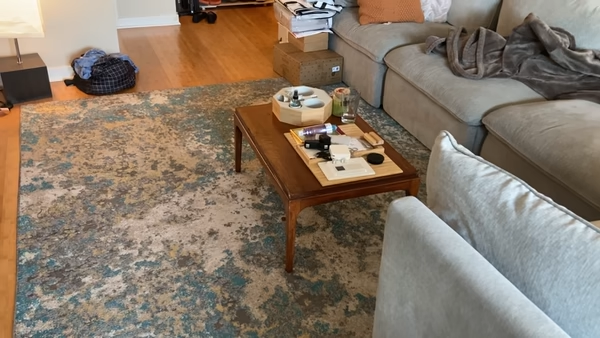
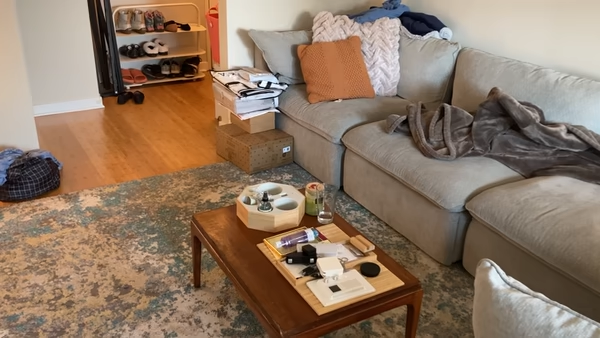
Parallax: THIS IS BY FAR THE MOST COMMON ISSUE. Sequence motion must have some parallax! That means the camera must move through space. 'Tripod shots' where there is only pan/tilt will not work. The camera must physically move for a 3D solve (not just pivot). Here is a shot with parallax and here is one without parallax.
Masking : THIS IS THE SECOND MOST COMMON ISSUE. Moving elements, reflections, and lens flares must be masked out! That means masking out your actor - masking out a super shiny floor - a giant tree blowing in the wind... basically any motion that doesn't represent the camera's motion.
Low Detail: Many low details shots can be recovered, but there is a point of no return. Heavily grainy, motion blurred, low detail (plain white walls for example), low resolution footage may not solve.
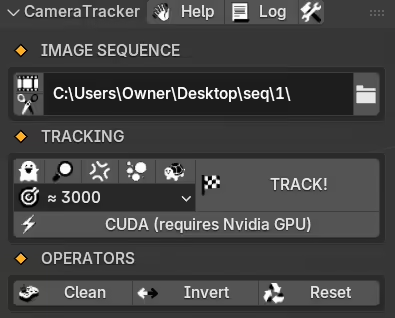
 Help: opens the CameraTracker documentation.
 Get Log: helps fetch the Blender log.
 Advanced Parameters: exposes advanced matching/solving parameters.
 Sequence from Video: selects a video and converts it into an image sequence in the same directory.
 Mask Actor: automatically creates a mask around the main detected actor.
 Mask: use the alpha of the sequence as a mask.
 Zoom: shot contains changing focal length.
 Undistort: undistort the sequence using calculated lens distortion.
 Densify: generate a dense point cloud of the scene.
 Accurate: use slower but far more accurate computation for the camera solve.
 Features: target number of features to extract per image.
 Run Tracker: track the camera using the current settings.
 Cuda: use cuda acceleration (Nvidia GPU only).
 Clean Points: find and delete outliers from the selected point cloud.
 Invert Motion: swap camera and object motion.
 Reset: reset the sequence folder for a new track.